

Choose a source path
Public assets are already prepared. Private uploads require an Asset Group, asset preprocessing, and anActive status before generation.
Use a public asset
Search the public asset library when the person or character already exists there. The list
endpoint returns an
assetId and thumbnail URL for selection interfaces.Use the returned ID as an asset URI, for example
asset://asset-20260225015229-d77t9. This path does not require Asset Group creation or asset
upload.List public assets ·
Get assetUpload your own face asset
Use this path for private image or video references. Keep assets for the same person or
character in one group when you need consistent appearance across tasks.Create Asset Group ·
List Asset Groups
Upload a private asset
1
Create or reuse an Asset Group
Create a Virtual Portrait Asset Group, or select an existing group that belongs to the current
GENGEN workspace.See Create Asset Group and
List Asset Groups.
2
Add the image or video
Pass a publicly reachable HTTPS URL to
Create asset. This endpoint does not accept a
Base64 upload.
3
Wait for the asset to become active
Asset preprocessing is asynchronous. Poll
Get asset while the status is
Processing, and do
not generate until Result.Status is Active.Preprocessing often completes in about five seconds, but clients should rely on the returned
status rather than a fixed delay.Generate the video
Prefix the Asset ID withasset://. Put image assets in assets.referenceImages and video assets
in assets.referenceVideos.
Path decision table
Use direct HTTPS media URLs only when the selected model supports direct media input and the media
does not require BytePlus face asset handling.
Automate path selection
A client application can choose the correct path after the user selects a model and media. The Asset Library path includes asynchronous preprocessing before the generation request.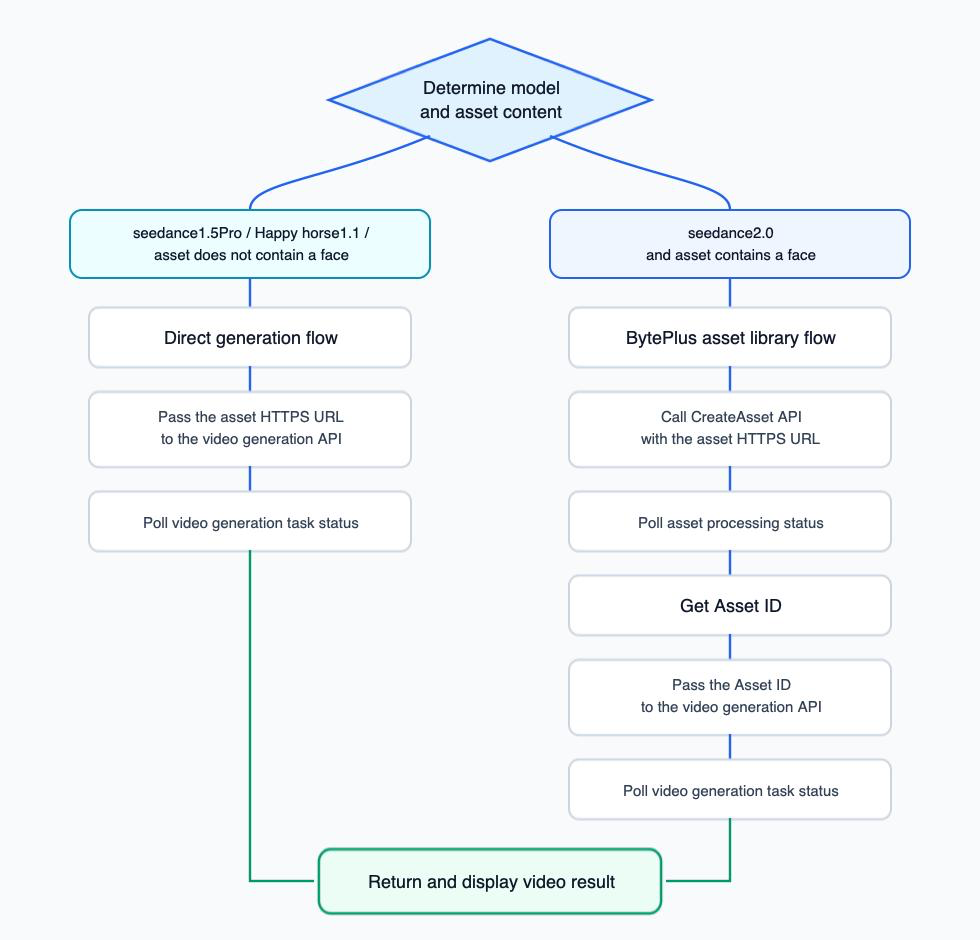
Choose the generation path from the selected model and whether the reference media contains a face.
Common mistakes
Passing a raw Asset ID
Passing a raw Asset ID
Use
asset://asset-..., not asset-..., in the generation payload.Referencing the Asset ID in the prompt
Referencing the Asset ID in the prompt
Prompts should use position references such as
Image 1 or Video 1.Generating before the asset is active
Generating before the asset is active
Uploaded assets are asynchronous. Poll Get asset and wait for
Active, even when
preprocessing usually completes quickly.Using the wrong asset field
Using the wrong asset field
Image assets belong in
assets.referenceImages; video assets belong in
assets.referenceVideos.