> ## Documentation Index
> Fetch the complete documentation index at: https://docs.gengen.farm/llms.txt
> Use this file to discover all available pages before exploring further.
# Generate videos with face assets
> Prepare public or private face assets for compliant Seedance video generation.
For Seedance 2.0, a reference image or video that contains a human face must be prepared as an
asset in a Virtual Portrait Asset Group before it can be used for video generation.
You must have valid permission to use a person's likeness. Do not upload or generate with
unauthorized real-person material.
## Choose a source path
Public assets are already prepared. Private uploads require an Asset Group, asset preprocessing,
and an `Active` status before generation.
Search the public asset library when the person or character already exists there. The list
endpoint returns an `assetId` and thumbnail URL for selection interfaces.
Use the returned ID as an asset URI, for example
`asset://asset-20260225015229-d77t9`. This path does not require Asset Group creation or asset
upload.
[List public assets](/api-reference/byteplus/assets/public-assets) ·
[Get asset](/api-reference/byteplus/assets/get-asset)
Use this path for private image or video references. Keep assets for the same person or
character in one group when you need consistent appearance across tasks.
[Create Asset Group](/api-reference/byteplus/assets/create-asset-group) ·
[List Asset Groups](/api-reference/byteplus/assets/list-asset-groups)
## Upload a private asset
Create a Virtual Portrait Asset Group, or select an existing group that belongs to the current
GENGEN workspace.
See [Create Asset Group](/api-reference/byteplus/assets/create-asset-group) and
[List Asset Groups](/api-reference/byteplus/assets/list-asset-groups).
Pass a publicly reachable HTTPS URL to
[Create asset](/api-reference/byteplus/assets/create-asset). This endpoint does not accept a
Base64 upload.
Asset preprocessing is asynchronous. Poll
[Get asset](/api-reference/byteplus/assets/get-asset) while the status is `Processing`, and do
not generate until `Result.Status` is `Active`.
Preprocessing often completes in about five seconds, but clients should rely on the returned
status rather than a fixed delay.
## Generate the video
Prefix the Asset ID with `asset://`. Put image assets in `assets.referenceImages` and video assets
in `assets.referenceVideos`.
Do not put the raw Asset ID in the prompt. Put the asset URI in the request payload, then refer
to it by position in the prompt, such as `Image 1` or `Video 1`.
```bash theme={"dark"}
curl -X POST "https://gengen.farm/api/gengen/v1/contents/generations/tasks" \
-H "Authorization: Bearer gengen_live_xxxxxxxxxxxxxxxx" \
-H "Content-Type: application/json" \
-d '{
"model": "dreamina-seedance-2-0-260128",
"mode": "multimodal_reference",
"prompt": "The person in Image 1 presents the product in a clean studio.",
"assets": {
"referenceImages": [
"asset://asset-20260427-abc"
]
},
"controls": {
"resolution": "720p",
"ratio": "16:9",
"duration": 5,
"generateAudio": true,
"watermark": false
}
}'
```
Use [Create video task](/api-reference/byteplus/video-generation/create-task) to submit the
request, then [retrieve the video task](/api-reference/byteplus/video-generation/retrieve-task)
until it reaches a terminal status.
## Path decision table
| Input condition | Automation path | Generation input |
| ---------------------------------------------------------- | ------------------------------ | -------------------- |
| A public asset is selected | Use the asset URI directly | `asset://` |
| Seedance 2.0 private media contains a face | Run the Asset Library flow | Active asset URI |
| Seedance 1.5 Pro, Happy Horse 1.1, or media without a face | Use the direct generation flow | HTTPS media URL |
Use direct HTTPS media URLs only when the selected model supports direct media input and the media
does not require BytePlus face asset handling.
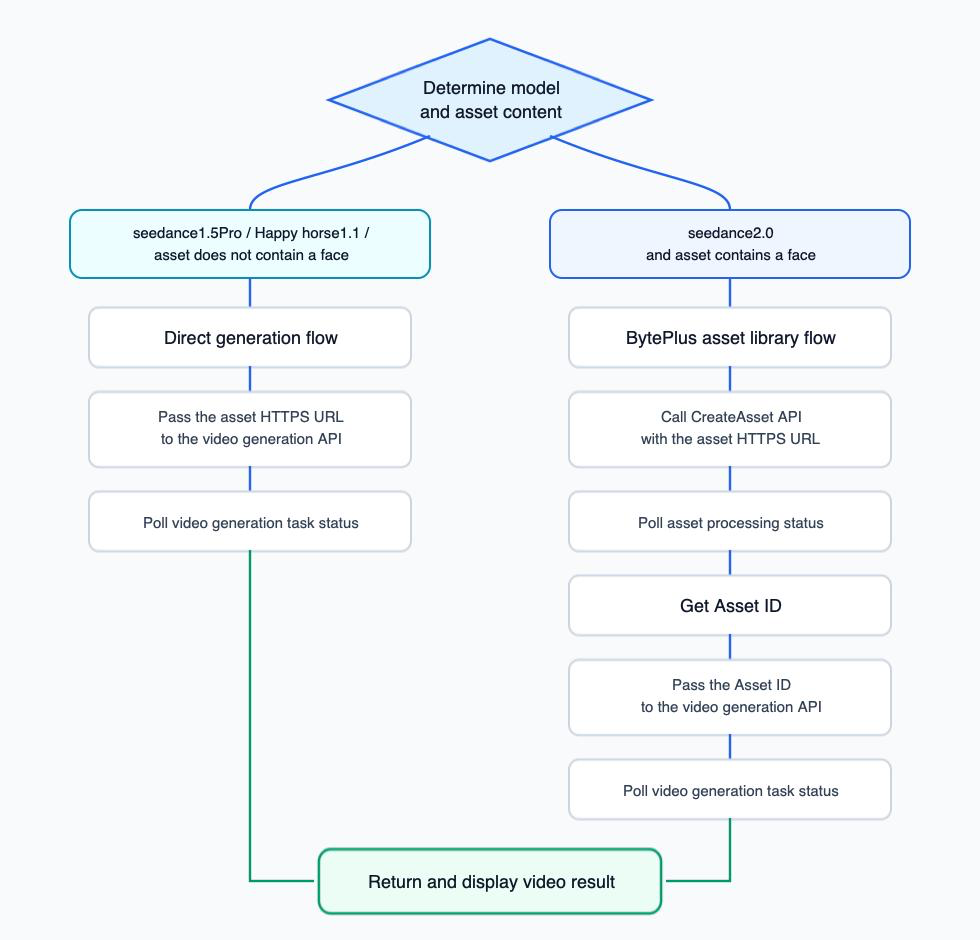
## Automate path selection
A client application can choose the correct path after the user selects a model and media. The
Asset Library path includes asynchronous preprocessing before the generation request.
## Common mistakes
Use `asset://asset-...`, not `asset-...`, in the generation payload.
Prompts should use position references such as `Image 1` or `Video 1`.
Uploaded assets are asynchronous. Poll Get asset and wait for `Active`, even when
preprocessing usually completes quickly.
Image assets belong in `assets.referenceImages`; video assets belong in
`assets.referenceVideos`.
Confirm that you hold valid consent and the required rights before uploading or generating
with a person's likeness.
You can also test supported request flows in the
[GENGEN API Explorer](https://gengen.farm/api-explorer).